Built in ChicagoAmerican supportNo long-term contractsCancel anytime800-915-0411
Home / Restaurant POS / Order & pay at the table

Order and pay at the table.

Your servers take the order on the PosNerd ordering app and send it straight to the kitchen. When guests are ready, bring the wireless card machine to the table. They tap, add a tip, split the check and get their receipt, without the card ever leaving their sight.

  • Ordering app for servers
  • Wireless card machine
  • Scan-to-pay QR code
  • Tips on the machine
  • Split the check
  • Bar tabs
Table 4 · CheckServer: Ana · 2 guests
2× Birria Tacos$25.98
1× Mexican Rice$4.50
2× Horchata$7.98
Total$38.46
Split 2 ways$19.23 each
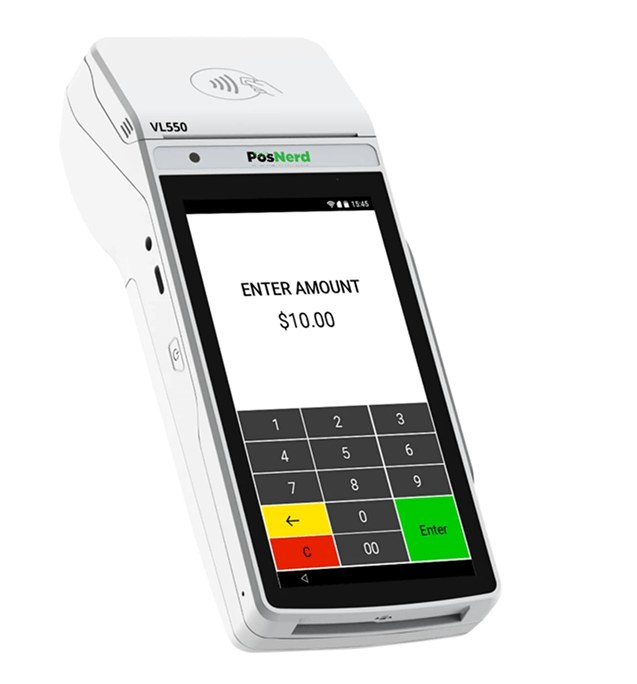
Wireless card machine with a built-in printer, brought to the table
✓ Tip added: 20%Guest 1 paid $23.08
Table 4Scan to pay QR codeScan to pay
⌂
Built in ChicagoDesigned & supported here
☎
Live supportReal people at 800-915-0411
30
30-day free trialNo card needed
✍
No contractsMonth to month

From order to paid, at the table

Your servers never have to walk away from the guest.

Take the order

The server takes the order on the PosNerd ordering app on a phone or tablet.

Kitchen gets it

It goes straight to the kitchen, and the server is notified when the food is ready.

Bring the check

Split it by guest if they ask. No running back and forth.

Guests pay at the table

Tap, chip or phone on the wireless machine, add a tip, and the receipt prints right there.

Ordering app

Your servers carry the whole restaurant

The PosNerd ordering app runs on a phone or tablet. Servers see every table, take orders at the table and send them to the kitchen.

▦

Every table at a glance

Which tables are free, how long guests have been seated, and which food is ready.

🍳

Straight to the kitchen

Orders go to the right kitchen or bar screen as soon as they are sent.

🔔

Food-ready alerts

The server gets notified the moment an order is ready to run.

➕

Modifiers done right

"No onion" and "extra hot" go to the kitchen exactly as the guest said.

Split 2 waysTable 4 · $38.46
✓Guest 1 paid
💳Guest 2 · $19.23
Pay $19.23
Split the check

Split it any way your guests want

One check for the table, or split between guests. Each guest pays their part on the card machine at the table.

✂

Split evenly or by guest

Turn on the Split Bill button for dine-in orders and set the most splits allowed.

💳

Each guest pays their part

One tap per guest, each with their own tip and receipt.

Nerd TacosTable 4QR code: scan to pay your checkScan to payPay your check from your phone
💳 Card · Apple Pay · Google Pay
Scan to pay

Or let guests scan and pay

Put a small QR code card on every table. When guests are ready, they scan it with their phone camera and pay their check by card, Apple Pay or Google Pay. No waiting for the server.

▣

A QR code on every table

Print the cards and leave one on each table, or print the QR code on the check.

📱

Pay from their phone

Card, Apple Pay or Google Pay. No app to download.

$

Tip right on the phone

Guests add a tip before they pay, and get the receipt by email or text.

Why restaurants pay at the table

🔒

Card stays with the guest

The card never leaves the guest's sight. Safer for everyone.

$

Bigger tips

Guests add the tip right on the machine before they pay.

✎

Tip adjust

Fix or add a tip from a paper receipt before you close out the day.

🍸

Bar tabs

Open a tab with a pre-authorization and close it at the end of the night.

⏱

Faster tables

No waiting for the check to go to the register and back.

🧾

Printed receipts

The wireless machine prints the receipt at the table.

📱

Tap, chip or phone

Cards, Apple Pay, Google Pay and Samsung Pay.

0%

0% processing

Our cash discount program works at the table too.

🌐

English & Spanish

For your staff and the system.

Questions

What do my servers need?

A phone or tablet with the PosNerd ordering app, and a wireless card machine to bring to the table.

Can guests split the check?

Yes. Turn on Split Bill for dine-in orders and each guest pays their own part.

How do tips work?

Guests add the tip on the card machine before they pay. You can also adjust a tip from a paper receipt before closing out the day.

Can I run bar tabs?

Yes. Open the tab with a pre-authorization and capture it when the guest closes out.

Does it work with 0% processing?

Yes. Our cash discount program works on the wireless machine too.

Can guests scan a QR code to pay?

Yes. Put a scan-to-pay QR code card on the table or on the check, and guests pay from their phone.

Order and pay at the table.

Call us and we'll set up the ordering app and wireless card machines for your restaurant.

  • Ordering app for servers
  • Pay at the table
  • Tips and split checks
☎Call$Free quote▶Demo